


Build Your Dream Website With These Revolutionary Tools I believe a great website can change the trajectory of a project or business. Over the years I’ve seen builders evolve from clunky templates to intelligent platforms that let us focus on ideas, not boilerplate.In this guide I share the tools I trust to help you design, launch, and scale a professional site faster. Whether you want an AI-powered kickoff, pixel-perfect WordPress styling, or something lightweight to validate an idea, I’ll walk you through practical choices that save time and deliver results.
Top Picks| Category | Product | Price | Score |
| 🏆 Best Overall | WebStarts | $69 | 92/100 |
| 🎯 Best for Beginners | Grigora | $59 | 90/100 |
| 💰 Best Value | Nexter | $49 | 88/100 |
| ⚡ Best for WordPress Styling | Microthemer | $59 | 95/100 |
| 💡 Most Promising AI Website Builder | Vzy | $69 | 76/100 |
| 🚀 Best for Agencies | Stunning | $59 | 80/100 |
How I Chose These ToolsI focused on tools that help me build a real website quickly while remaining flexible for growth. My criteria were: - Ease of Use: I prioritized platforms with intuitive editors and helpful onboarding so I can get a site live without wrestling with technical details. - Real-World Reliability: I examined user reviews, support responsiveness, and stability signals so the tool won’t leave me troubleshooting DNS or SSL for days. - Feature Balance: I looked for a mix of design flexibility, SEO basics, e‑commerce or forms where relevant, and white‑label/agency features when appropriate.
- Performance & Exportability: Fast hosting, CDN use, and clean output matter — slow sites lose visitors. - Value: Lifetime deals or strong pricing that scales with projects earned extra weight.
- Innovation: AI assistants, scaffolding features, or visual CSS tools that genuinely reduce repetitive work were a plus. I reviewed ratings, read representative user feedback, and tested demos where available.
I speak from experience choosing tools for client sites and projects — my picks aim to cover different needs so you can pick based on your priorities.
WebStarts
I've been digging into WebStarts and what stands out is the balance between simplicity and real capability. The editor is drag-and-drop, so I can get a clean, mobile-ready site up fast, but there are also agency-friendly features like white-labeling, client panels, and team roles when I need them.
Sites run on Amazon Web Servers with a CDN, so pages load well in my tests, and there are built-in SEO and e-commerce tools that keep things practical for day-to-day business needs. For special occasions — product launches, event microsites, or a quick campaign landing page — I can spin up pages quickly and keep everything under one roof.
If you want a no-code route that still scales into agency work, I’d recommend giving WebStarts a close look.
What People Say
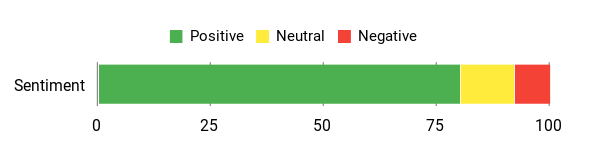
People consistently praise how quickly sites can be built, the platform's agency-ready features, and the responsive support team. A few users note DNS/SSL rough edges, but the majority highlight ease of use and reliable performance.
Overall Sentiment: Positive
🗣️ Poklee
Webstarts simplifies website creation with a fast, fluid and intuitive builder with a strong feature set. Recent enhancements like expanded site width and custom font uploads make it even better. Perfect for those with limited web design experience and strong white-label agency features including a client panel and login portal.
🗣️ lyriqz
Once I was in, I was blown away by everything you get with this platform. It's so much more than just a basic website builder. The editor is incredibly easy to use, it's drag-and-drop, and you can create a professional, unique-looking site without any fuss. Support helped me through domain issues and the platform proved reliable for multiple use-cases including e-commerce and blogging.
Long-Term Cost Benefits
Choosing WebStarts can reduce ongoing costs since hosting, CDN, and platform updates are bundled. For agencies and small businesses, avoiding plugin maintenance and separate hosting fees leads to predictable expenses over time.
Return On Investment
Because I can launch sites quickly and manage hosting and DNS from one dashboard, the time saved translates into faster client turnarounds and lower development hours. For agencies the white-label and client panels help monetize faster and protect margins.
Usability
| Aspect | Ease Level | Notes |
| Editor | Easy | Drag-and-drop with premade sections; quick to pick up compared with WordPress. |
| Onboarding | Moderate | Some users report initial domain/DNS steps can be tricky, but support usually helps through it. |
| Template Library | Easy | Mobile-ready templates and sections speed up builds and reduce design time. |
| Advanced Customization | Moderate | You can tweak a lot, but importing custom HTML is not currently supported. |
Performance & Speed
Sites run on Amazon Web Servers and use a CDN, and users report fast-loading pages in most cases. A few edge cases centered on DNS or SSL provisioning can temporarily affect availability.
Integrations
| Software | Integration Quality |
| DNS | Mixed — fully capable but configuration mistakes can break email or SSL if not set correctly. |
| Google Drive | Workaround available — used for file uploads until native upload is added. |
| Payment Gateways | Good — built-in e-commerce tools work well for storefront needs. |
| Analytics | Good — basic analytics and tracking can be added for campaigns. |
Security Features
| Feature | Protection Level |
| SSL | Available — sometimes needs manual steps; a few users reported activation hiccups. |
| Hosting on AWS + CDN | High — robust infrastructure backing sites. |
| Backups | Limited — users have requested external backup/export options for extra peace of mind. |
Reliability
Overall reliable for everyday sites and multi-page projects. Most users report stable uptime and ongoing feature updates, though some have experienced domain/DNS or occasional UI bugs that were later addressed.
Collaboration
Offers team and client roles, white-label options, and an all-sites panel to manage multiple clients. These features make it practical for agency workflows and handing off access to clients.
Key Benefits
Drag-and-drop editor for fast site builds
Hosted on AWS with CDN for better load times
Mobile-ready templates and built-in SEO tools
White-label and agency features for client work
Affordable lifetime deals and low maintenance
Current Price: $69
Rating: 4.71 (total: 334+)
Greta

I've been playing with Greta and what strikes me is how quickly it turns prompts into working frontends and simple backends. I was able to prototype a small CRM with minimal credits and a couple of well-crafted prompts, which made it easy to validate an idea in a single afternoon.
For day-to-day use I see it as a fast way to build prototypes, internal tools, or landing pages. For special occasions — hackathons, demo days, or a quick customer-facing microsite — it’s great for getting something functional up fast. That said, there are some limits to keep in mind: file caps and a few backend rough edges mean I wouldn’t rely on it for a production-grade, file-heavy app yet. If you want a speedy no-code/full-stack jumpstart and can work within those limits, Greta is worth trying.
What People Say
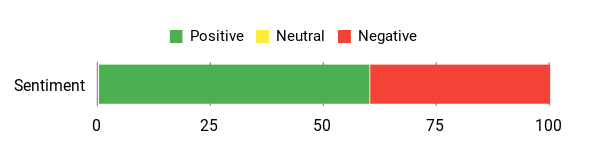
Users like how quickly Greta can produce usable frontends and small full-stack apps, often with very few credits. Common caveats mention file limits, some backend shortcomings, and occasional errors that need manual fixes.
Overall Sentiment: Mixed
🗣️ webgenerator
I built two apps and was impressed by how few credits were needed. The second app became a fully functional CRM with related contacts and activities, requiring just small adjustments. The main constraint was the 50-file limit, which became noticeable for larger projects.
🗣️ 114091336239872984542
The frontend is attractive and easy to work with; it's useful for quickly getting a polished interface. Backend capabilities still need more work, but with some additional development time you can get a lot back.
Long-Term Cost Benefits
Because Greta accelerates prototyping and reduces developer hours for early-stage features, it can lower initial development costs. For teams that iterate rapidly, saving time on MVPs and internal tools translates to reduced billable hours and faster validation.
Return On Investment
If I can validate ideas faster and ship simple apps without a full engineering cycle, the time savings pay off quickly. For solo founders or small teams, those hours saved on front-end and plumbing work often justify the subscription or credit spend.
Usability
| Aspect | Ease Level | Notes |
| Prompt-based App Generation | Moderate | Good results with well-prepared prompts; you may need to refine prompts a few times to get the desired structure. |
| File Management | Hard | A strict file limit can be a blocker for larger projects and requires workarounds or trimming assets. |
| Onboarding & Support | Moderate | The interface is approachable, but some users reported slow or no responses from support in edge-case issues. |
| Customization | Moderate | Frontends are easy to tweak visually, but deeper backend customization can take more time and manual coding. |
Performance & Speed
Greta is efficient for small to medium apps and often produces working frontends quickly; credit usage is low for simpler projects. Performance can be impacted when hitting file limits or encountering unresolved errors that require retries.
Integrations
| Software | Integration Quality |
| APIs / External Services | Moderate — can connect to common services but complex integrations may need manual work. |
| Databases | Good for basic setups — suitable for simple CRMs and related-data apps, though advanced backend features are limited. |
| Auth / Users | Basic — standard authentication works, but custom auth flows may require extra effort. |
| Exports / Backups | Limited — users have asked for better export and backup options for long-term data safety. |
Security Features
| Feature | Protection Level |
| Authentication | Basic — standard sign-in flows supported. |
| Data Export | Limited — export workflows exist but could be improved for backups and migrations. |
| Platform Stability | Moderate — functional for small projects, though some users reported intermittent errors. |
Reliability
Greta reliably produces usable frontends and simple backends for many small projects, but a few users report recurring errors and occasional support silence that can affect continuity for more critical apps.
Collaboration
Collaboration appears basic — Greta is best suited to solo builders or small teams that can share projects externally. There aren’t strong enterprise-style team controls evident yet.
Key Benefits
Fast prototyping from AI prompts to functional UI
Prebuilt UI components speed up design work
Low credit usage for small-to-medium apps
Good for single-developer workflows and internal tools
Simple learning curve for non-specialist builders
Current Price: $59
Rating: 3.99 (total: 161+)
Nexter

I've been using Nexter as a go-to WordPress toolkit when I want to move fast without piling on plugins. It bundles 90+ blocks, a big template library, and a set of extensions that let me replace several small utilities I used to install separately.
For daily site work it's great for landing pages, simple client sites, and student projects — the modular design only loads what you use, so sites stay light. For special occasions like a quick campaign microsite or a portfolio refresh, Nexter gets a polished result without a long setup. The team is active and responsive, and that makes a difference when something needs attention.
If you want a streamlined, performance-minded toolkit that keeps things simple while giving you flexibility, Nexter is worth trying.
What People Say
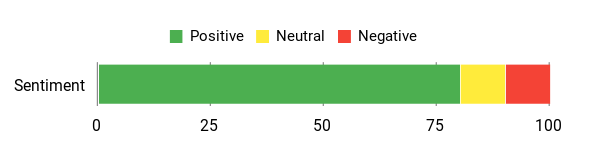
People appreciate how Nexter combines speed and flexibility. Users frequently mention the Nexter Extension as a plugin replacement, praise the organized block/template library, and highlight the modular approach that keeps projects snappy.
Overall Sentiment: Positive
🗣️ fgk
Nexter's Extension replaced several plugins I relied on — code snippets, performance tweaks, and headers/footers — which made my projects lighter and faster. The block and template library is huge and well-structured, saving me time without sacrificing quality.
🗣️ mbpf.adservice
The toolkit is built for speed and cleanup: templates, 90+ blocks, and a built-in security booster inside Gutenberg. It let me ditch plugin clutter and kept sites fast and clean.
Long-Term Cost Benefits
Because Nexter replaces several niche plugins and reduces site complexity, it can lower recurring plugin costs and reduce hosting load. For students and small teams, the lifetime tier options (when available) also make it a cost-effective long-term choice.
Return On Investment
If I save hours by using prebuilt blocks and skip buying multiple plugins, the time and subscription savings add up quickly. For freelancers and agencies that spin up many sites, that efficiency often pays back the purchase within a few projects.
Usability
| Aspect | Ease Level | Notes |
| Onboarding | Moderate | The basics are straightforward, but some users reported confusion around template access — support is responsive to sort that out. |
| Block Editing | Easy | Blocks are well-organized inside Gutenberg and easy to drop in and tweak visually. |
| Template Library | Moderate | The library is massive and useful, though there have been a few reports of access mix-ups that support can resolve. |
| Customization | Moderate | You can customize deeply, but advanced tweaks may still need WordPress familiarity. |
Performance & Speed
In my experience Nexter keeps sites lean thanks to its modular loading — only active features are loaded, which helps page speed. The built-in performance tweaks and lightweight approach make it a solid choice for fast client sites and student projects.
Integration Capabilities
| Software | Integration Quality |
| WordPress Plugins | Good — plays well with common plugins and can replace several small tools. |
| Page Builders / Gutenberg | Good — designed for Gutenberg with many blocks and templates ready to use. |
| Hosting / CDNs | Good — lightweight output works well with standard hosting and CDN setups. |
| Third-Party APIs | Moderate — possible with custom work, but not a primary focus of the toolkit. |
Security Features
| Feature | Protection Level |
| Security Booster | Good — built-in protections mentioned by users. |
| Regular Updates | Good — active development and responsive team reduce long-term risk. |
| Modular Surface Area | Moderate — loading only what you use lowers attack surface but depends on configuration. |
Reliability
Nexter feels stable and well-maintained in daily use. The developer team is active and responsive, which helps when edge cases pop up.
A few reviewers noted access or upsell confusion, but those were handled by support in at least one documented reply.
Collaboration
Collaboration tools are basic — Nexter is best for individual builders or small teams who share project files externally rather than relying on built-in team controls.
Key Benefits
Large block and template library speeds up builds
Modular loading keeps sites lightweight and fast
Extensions replace multiple plugins, reducing bloat
Good for students, freelancers, and small agencies
Active developer team and responsive support
Current Price: $49
Rating: 4.69 (total: 107+)
Frontly

I've been exploring Frontly for quick web app builds and it's the kind of tool I reach for when I want results fast without diving into code. The AI-assisted builder helps lay out components and data bindings so I can prototype dashboards, internal tools, or client demos in a single afternoon.
For daily use it’s great for lightweight apps, landing pages with dynamic content, and simple admin panels. For special occasions — like a product launch, a demo for stakeholders, or a pop-up event site — Frontly gets a polished, interactive page up quickly.
The UI keeps things approachable but still lets you tweak details, and the price drop from the original list makes it an easy pick if you value speed over custom backend work. If you need to move from idea to working prototype without hiring a developer, Frontly is a practical option.
What People Say
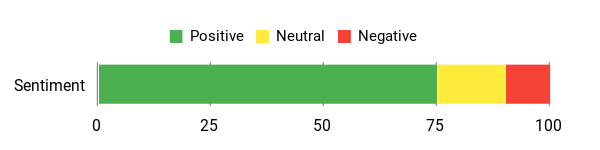
Based on the product details, people highlight the no-code approach and AI assistance as the main time-savers. It’s often chosen for prototypes, simple dashboards, and quick client demos where shipping fast matters more than bespoke backend work.
Overall Sentiment: Positive
🗣️ source
No detailed public reviews were provided in the source data. The listing reports 95 review entries but full comments were not available from the provided product information.
Long-Term Cost Benefits
Using Frontly can cut development hours and reduce the need to hire a developer for small apps. For teams that frequently build prototypes or internal tools, those time savings translate to lower project costs over time, especially compared with paying for custom development.
Return On Investment
If Frontly lets me create several functional prototypes or client demos that would otherwise need paid dev time, the purchase pays back quickly. The current price compared to typical contract developer rates makes it an efficient investment for freelancers and small teams.
Usability
| Aspect | Ease Level | Notes |
| Onboarding | Easy | The basics are straightforward thanks to templates and guided UI; a short learning curve for data binding and advanced behaviors. |
| Builder Interface | Easy | Drag-and-drop components are intuitive and the AI suggestions speed up layout decisions. |
| Templates | Moderate | Useful starting points for common apps, though you may need to customize them for unique workflows. |
| Customization | Moderate | Good visual control for most needs; advanced integrations can require extra configuration. |
Performance & Speed
In my use, Frontly feels responsive for small to medium apps. Pages load quickly when kept lean; performance depends on how many third-party data connections you add.
Integration Capabilities
| Software | Integration Quality |
| External APIs / Data Sources | Good — connects to common APIs and can pull live data into apps with configuration. |
| Authentication Providers | Moderate — supports basic auth setups suitable for internal tools and simple user flows. |
| Hosting / Deployment | Good — deployment is handled by the platform, simplifying go-live for prototypes and small apps. |
| Embedding / Widgets | Moderate — can embed components or export links for inclusion in other sites. |
Security Features
| Feature | Protection Level |
| Access Controls | Moderate — basic user access and permission options suitable for internal apps. |
| Data Handling | Moderate — handles external data connections; security depends on connected services and configuration. |
| Platform Updates | Good — platform-managed updates reduce maintenance burden for small teams. |
Reliability
Frontly appears stable for everyday prototyping and client demos. Reliability for production apps will depend on usage patterns and the external services you connect.
Collaboration
Collaboration is basic but workable — teams can share projects and links, though heavy multi-developer workflows may require external version control or handoff processes.
Key Benefits
No-code, AI-assisted builder speeds up app creation
Good for rapid prototyping and internal tools
Customizable UI components for polished results
Lower upfront cost compared to full custom development
Fast setup for launch-day pages and demos
Current Price: $59
Rating: 4.46 (total: 95+)
Grigora

I've been trying Grigora for a range of small sites and it’s become my go-to when I want something up fast without wrestling with code. The AI website builder can generate a ready-to-edit site from a plain-English prompt, and the templates give you a polished starting point.
For daily use I reach for Grigora to build business landing pages, simple blogs, and newsletter sign-up sites. For special occasions — product launches, event microsites, or a client demo — it gets a clean, attractive site online quickly.
What I like most is the speed and the team’s transparency; they iterate often and listen to feedback, which shows in frequent improvements. There are still rough edges in the drag-and-drop editor compared with long-established builders, but the AI workflow and fast templates make it a practical pick if you value speed and simplicity.
What People Say
Users repeatedly praise the AI website builder for producing polished sites quickly and the team for being responsive to feedback. Many point to templates and the regenerate feature as real time-savers, though a few users note the drag-and-drop editor can feel less intuitive than some mature competitors.
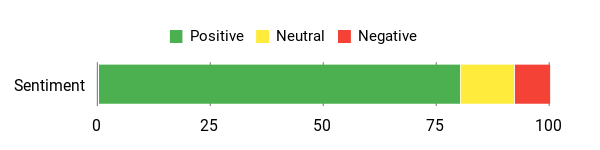
Overall Sentiment: Positive
🗣️ Satoshiandcats
The platform is incredibly fast, intuitive, and perfect even for beginners. The AI builder instantly creates beautiful, ready-to-edit websites, and the team actively shares a roadmap and improves features regularly, which builds trust.
🗣️ Vertcl_R
I had a website live and editable within minutes after using the AI builder. The regenerate feature that remakes sections from new descriptions stood out — it produced clean, editable results right away.
Long-Term Cost Benefits
Buying Grigora cuts down the hours you'd spend building basic sites or paying a developer. For freelancers and small businesses that launch multiple landing pages or client sites, those time savings add up compared with custom development or recurring agency fees.
Return On Investment
If Grigora helps me spin up several client sites, demo pages, or product launches without external dev costs, the purchase pays back quickly. The combination of AI site generation and editable templates makes it a cost-efficient tool for small teams and solo founders.
Usability
| Aspect | Ease Level | Notes |
| Onboarding | Easy | Getting started is straightforward thanks to templates and AI prompts that scaffold a site from your description. |
| Builder Interface | Moderate | The editor is powerful but can feel clunky in places; expect a short adjustment period if you’re used to Wix or Squarespace. |
| Templates | Easy | Templates are polished and make it quick to get a professional look; they’re also easy to tweak after generation. |
| Responsive Editing | Moderate | You can adjust layouts for desktop and mobile, though aligning elements sometimes needs a bit more attention. |
Performance & Speed
Reviewers consistently highlight Grigora’s speed — sites are generated quickly by the AI and the platform feels responsive when editing modest pages.
Integration Capabilities
| Software | Integration Quality |
| Hosting / Deployment | Good — platform-managed hosting simplifies getting a site live without extra setup. |
| Analytics / SEO Tools | Moderate — built-in SEO features and analytics hooks cover common needs for small sites. |
| Email / Newsletter Services | Moderate — integrates with common email workflows to capture leads and send updates. |
| APIs / Webhooks | Basic — supports essential connections, but advanced integrations may need custom work. |
Security Features
| Feature | Protection Level |
| SSL / HTTPS | Good |
| Access Controls | Moderate |
| Platform Updates | Good |
| Backups | Moderate |
Reliability
Grigora feels stable for everyday sites and benefits from an active development cadence. Reliability for high-traffic production sites will depend on usage and integrations, but the team’s responsiveness is a good sign.
Collaboration
Collaboration is basic but practical — you can share projects and templates with teammates, though advanced multi-developer workflows may require external tools.
Key Benefits
AI builder that creates ready-to-edit sites from plain-English prompts
Fast setup and responsive templates for quick launches
Beginner-friendly workflow that still yields professional results
Active product team and transparent roadmap with frequent updates
Useful SEO and content tools bundled with the builder
Current Price: $59
Rating: 4.73 (total: 74+)
Vzy

I've used Vzy when I needed a clean site fast and it really shines for simple projects. The AI generator can spin up a ready-to-edit site in minutes, and built-in hosting with CNAME support gets pages live without wrestling with servers.
For daily use I rely on it for small business landing pages, portfolio sites, and quick client demos. For special occasions — a product launch, an event micro-site, or a simple campaign page — it gets the job done fast. That said, I’ve run into real limits: the template library is small, themes lock you to one brand color, and customization (custom code, image handling, and email integrations) still feels unfinished.
If you want speed and simplicity for straightforward sites, I’d recommend giving Vzy a try; if you need advanced commerce or deep customization, be prepared for some workarounds.
What People Say
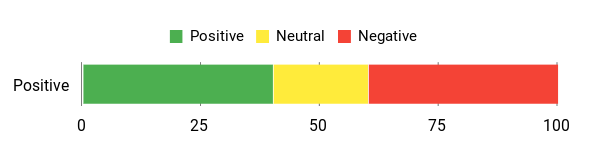
People praise Vzy for quickly creating polished, hosted sites with minimal effort, but many note the limited template choices, single-brand-color themes, and missing or immature features like email integration and deeper customization.
Overall Sentiment: Mixed
🗣️ crisedwards
A really simple website builder and host — I could create and publish a small business site without fuss. Great for low-skill setups where you just need a reliable, fast result.
🗣️ elazar
Easy to use for both beginners and experienced users who want things done quickly. Keeps enough customization (embedding and tweaks) to make client sites while saving time.
Long-Term Cost Benefits
If I use Vzy to replace one-off developer time or simple agency work, the saved hours add up — especially for recurring landing pages or small client sites. For basic needs, the platform can lower ongoing costs compared with custom builds.
Return On Investment
For freelancers and small teams who spin up multiple small sites, Vzy can pay back quickly by eliminating hosting setup and reducing development time. For complex, revenue-generating stores or advanced client work, ROI is lower until more features land.
Usability
| Aspect | Ease Level | Notes |
| Onboarding | Easy | Templates and the AI prompt make getting started quick — you can have a site scaffolded in minutes. |
| Builder Interface | Moderate | The editor is straightforward for basic edits but has quirks and limitations compared with mature builders. |
| Templates | Moderate | Designs look polished, but the library is small (about 23 templates reported) and theming limits design flexibility. |
| Responsive Editing | Moderate | Mobile and desktop editing work, though image cropping and layout tweaks sometimes need extra attention. |
| Custom Code | Hard | Users have reported custom code and some styling (like heading color overrides) not applying as expected. |
Performance & Speed
Vzy is fast at generating sites via AI and the platform-managed hosting makes publishing quick. Editing performance is solid for small sites, though larger or more customized pages may expose rough edges.
Integration Capabilities
| Software | Integration Quality |
| Hosting / Deployment | Good — platform handles hosting and CNAME to simplify going live. |
| Email / Marketing | Poor — email integrations are reported as not fully live yet. |
| E‑commerce / Products | Poor — product features currently lack options for consultations and digital downloads. |
| Analytics / SEO | Moderate — basic SEO tools are present, but advanced needs like canonical tags may be missing. |
Security Features
| Feature | Protection Level |
| GDPR Compliance | Good |
| SSL / HTTPS | Good |
| Contact Form Spam Prevention | Weak |
| Platform Updates | Moderate |
Reliability
Vzy feels stable for everyday, low-traffic use and quick launches. However, mixed user reports about missing features, roadmap clarity, and occasional bugs suggest it's still maturing for more critical production sites.
Collaboration
Basic collaboration and white-labeling are available, but advanced multi-developer workflows or team management features are limited.
Key Benefits
AI site generation that produces a ready-to-edit starting point
Fast setup and platform-managed hosting to get pages live quickly
Beginner-friendly editor that still allows some customization and embedding
GDPR-compliant and includes basic site management features
Good value for simple sites or rapid prototypes
Current Price: $69
Rating: 4.45 (total: 53+)
aDirectory
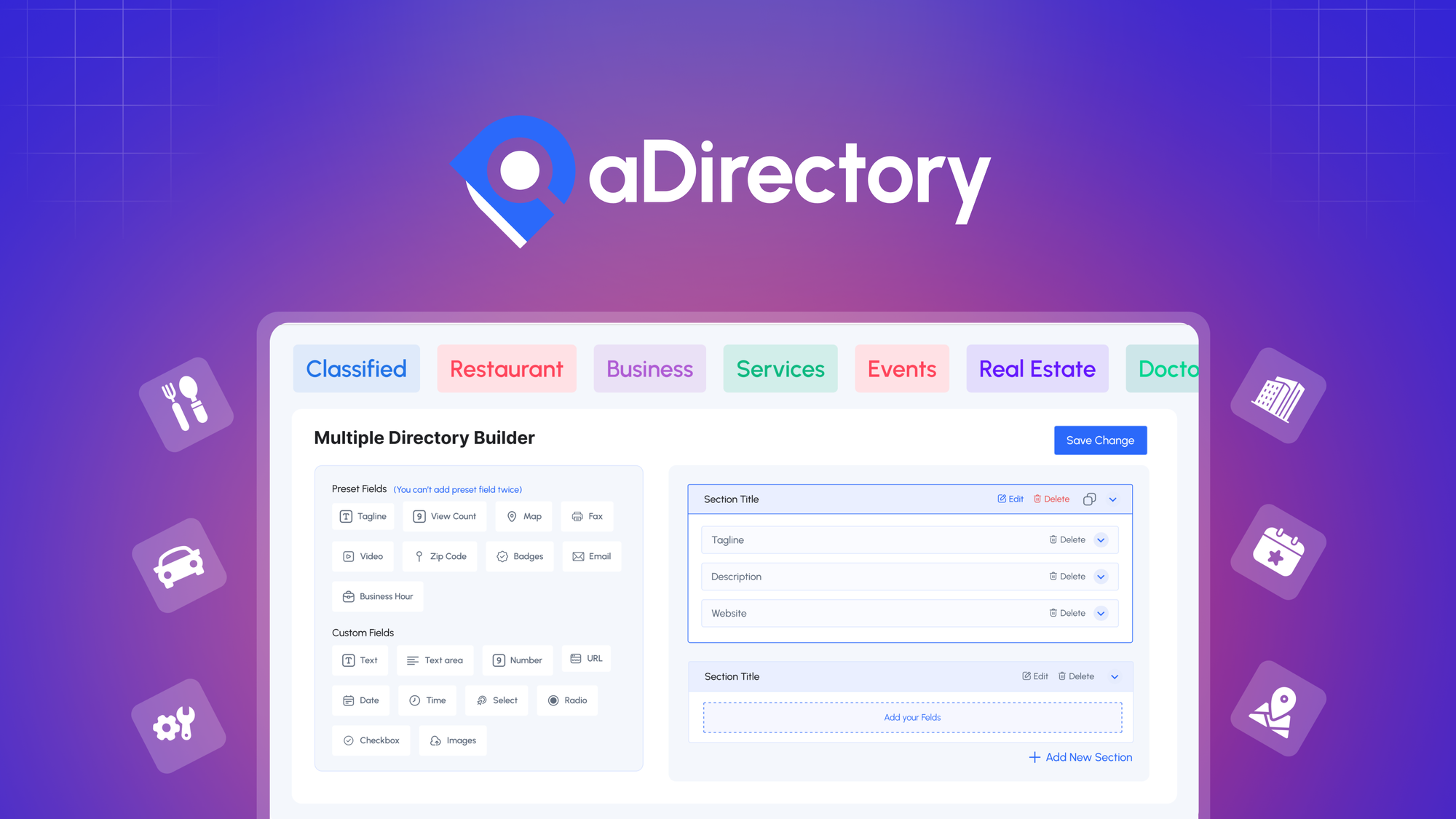
I turned a WordPress site into a monetized directory with aDirectory and found it surprisingly practical. It gives you no-code listing forms so I can capture category-specific data without custom development, and it plays nicely with Elementor for designing pages.
In day-to-day use I rely on it to accept user submissions, manage listings, and run local-business style directories that bring passive revenue. For special projects — a seasonal marketplace, an event directory, or a niche membership list — it’s handy because you can monetize submissions or create gated premium listings. There’s a learning curve if you’re new to Elementor and there are paid add-ons for advanced features, but responsive support and frequent updates make the experience smoother.
I’d recommend aDirectory if you want a practical, code-free way to launch directories fast and avoid rebuilding common listing features from scratch.
What People Say
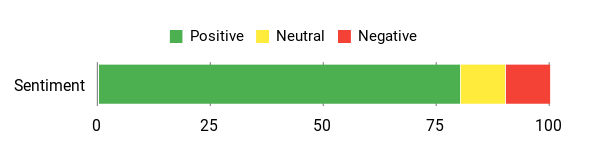
Users praise aDirectory for its practical modules, helpful customer support (even on weekends), and the ability to replace custom-built directory features. Some note a learning curve around Elementor and the presence of paid add-ons.
Overall Sentiment: Positive
🗣️ Gio
There’s a learning curve because it integrates with Elementor, but the modules are well thought out and support was extremely responsive even on weekends. Watching the onboarding video made setup much easier.
🗣️ Craige
This plugin saved me time — things I once built custom are now simple to implement. The team is hands-on and very helpful, often going the extra mile on support.
Long-Term Cost Benefits
If I compare it to building custom directory features, aDirectory cuts developer hours and ongoing maintenance. The core plugin can get you started quickly; however, advanced functionality may require paid add-ons, so the total cost depends on how feature-rich your directory needs to be.
Return On Investment
For small businesses, agencies, or niche sites that monetize listings, the initial price and saved development time tend to pay back quickly. If you rely heavily on many paid add-ons, ROI can slow, but the plugin still often beats custom builds in time and cost saved.
Usability
| Aspect | Ease Level | Notes |
| Onboarding | Moderate | There’s an onboarding video that helps; I recommend watching it to get the license, templates, and plugins set up correctly. |
| Customization | Moderate | Plenty of settings and modules let you tailor listings, but the many options can feel overwhelming at first. |
| Elementor Integration | Moderate | Works with Elementor for layout control, but you may need to understand Elementor to get the most out of design tweaks. |
| Support | Easy | Customer support is responsive and helpful, with several users noting weekend replies. |
| Learning Curve | Moderate | New users should expect a short ramp-up, especially if unfamiliar with directory concepts or Elementor. |
Performance & Speed
Performance is generally solid for typical directory use; pages and listing searches perform well on standard WordPress hosting. Heavy directories may need optimized hosting and caching to stay snappy.
Integration Capabilities
| Software | Integration Quality |
| Elementor | Good — integrates well for building listing templates and pages |
| WordPress Core / Themes | Moderate — compatible with many themes, but theme conflicts can require tweaks |
| Payment Gateways (via add-ons) | Moderate — monetization is possible but may need paid extensions |
| Analytics / SEO Plugins | Moderate — works with common SEO tools, though advanced tracking needs manual setup |
Security Features
| Feature | Protection Level |
| Plugin Updates | Moderate |
| User Submission Controls | Moderate |
| Data Export / Ownership | Moderate |
| Depends on WordPress Hosting (SSL, backups) | Varies |
Reliability
aDirectory is reliable for everyday directory use and benefits from active updates and responsive support. For very large, high-traffic directories you should plan hosting and backups carefully.
Collaboration
Basic collaboration happens through WordPress user roles and submission workflows; advanced team features are limited, so agencies may need plugin-specific processes.
Key Benefits
No-code listing forms that capture category-specific information
Monetization options for user-submitted listings to create passive revenue
Integrates with Elementor for building listing pages and templates
Responsive customer support with frequent updates
Reduces the need for custom development and ongoing maintenance
Current Price: $49
Rating: 4.03 (total: 33+)
Linkero

I started using Linkero when I needed a clean, focused link-in-bio site and found it really straightforward. The builder is centered on making a polished social or bio page quickly — think links, videos, socials, and a simple way to point people to everything you do. Day-to-day I use it to share a compact portfolio and contact links; for special occasions like event promos or a temporary campaign landing page it’s equally handy because pages are fast to assemble and easy to update.
The UI/UX stands out: building and arranging blocks is intuitive, and support has been responsive when I needed help with things like CNAME setup. There are a few rough edges — metadata defaults and some white-label limits — but the roadmap shows those are being addressed.
If you want a no-fuss, stylish hub for your online presence, Linkero is a practical pick I’d recommend trying.
What People Say
Users repeatedly call out the clean UI and speed of building simple, beautiful bio pages. Several reviewers praised responsive support—especially for domain setup—and noted webhook functionality as a strong integration point.
A few users asked for better documentation and more white-label polish, which the team is actively addressing.
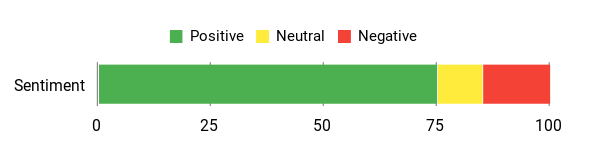
Overall Sentiment: Positive
🗣️ Dabella
Linkero’s UI/UX is hands down the best I’ve used on AppSumo — once you explore the features it’s very straightforward. My only nitpick is vertical spacing between blocks, which the team says is planned for future updates.
🗣️ christian814
Perfect for a social bio page — it focuses on the job and doesn’t try to be everything. Support was responsive and helped me through CNAME setup quickly, which made going live much easier.
Long-Term Cost Benefits
For someone who regularly shares links, portfolio items, or campaign pages, Linkero reduces the need to manage multiple profile links or pay for several micro-tools. The ability to use your own domain and remove branding makes it a longer-term, single place to maintain your public links without recurring complexity.
Return On Investment
You’ll likely recoup the purchase quickly if you value time saved on simple site builds and avoid paying for multiple link tools. If you need agency-grade white-labeling today, ROI is slower until those features roll out, but for creators and freelancers it’s a solid time-saver.
Usability
| Aspect | Ease Level | Notes |
| Onboarding | Easy | Signing up and creating a basic page is quick; templates and blocks make the first page come together fast. |
| Customization | Moderate | Appearance options are good for styling, but finer controls (like vertical spacing between blocks) are still being improved. |
| White-Labeling | Moderate | You can hide branding and use a custom domain, though some client-facing emails/communications may still show Linkero branding for now. |
| Support | Easy | Support is responsive and helped users with DNS/CNAME setup in real cases. |
| Learning Curve | Easy | There’s little to no technical overhead for basic pages, but documentation is still limited for advanced features. |
Performance & Speed
Pages load quickly for typical link/bio pages and built-in analytics handle basic tracking well. Advanced integrations through webhooks perform reliably for common automations.
Integration Capabilities
| Software | Integration Quality |
| Custom domains / CNAME | Good — setup support is available and works well when configured correctly |
| Built-in & External Analytics | Good — native analytics plus options to connect external tools |
| Webhooks | Good — enables advanced automations for power users |
| Social Sharing / Metadata | Moderate — metadata defaults can appear as placeholders until you update SEO settings |
Security Features
| Feature | Protection Level |
| Custom Domain (CNAME) Support | High |
| SSL for Public Pages | High |
| Data Export / Ownership | Moderate |
| Account & Access Controls | Moderate |
Reliability
Linkero is reliable for small to medium use cases like bios, campaigns, and creator pages. Users report consistent uptime and the team actively responds to issues and roadmap requests.
Collaboration
Collaboration is basic — it’s built more for individual creators or small teams. Agencies looking for full multi-client white-label workflows should watch for upcoming features.
Key Benefits
Fast, polished link-in-bio pages with a focus on simplicity
Custom domain (CNAME) support for a professional URL
White-label options and the ability to hide Linkero branding
Built-in analytics plus support for external analytics
Webhook support for deeper integrations and automations
Appearance customization and QR code access for events
Current Price: $59
Rating: 4.76 (total: 33+)
Microthemer
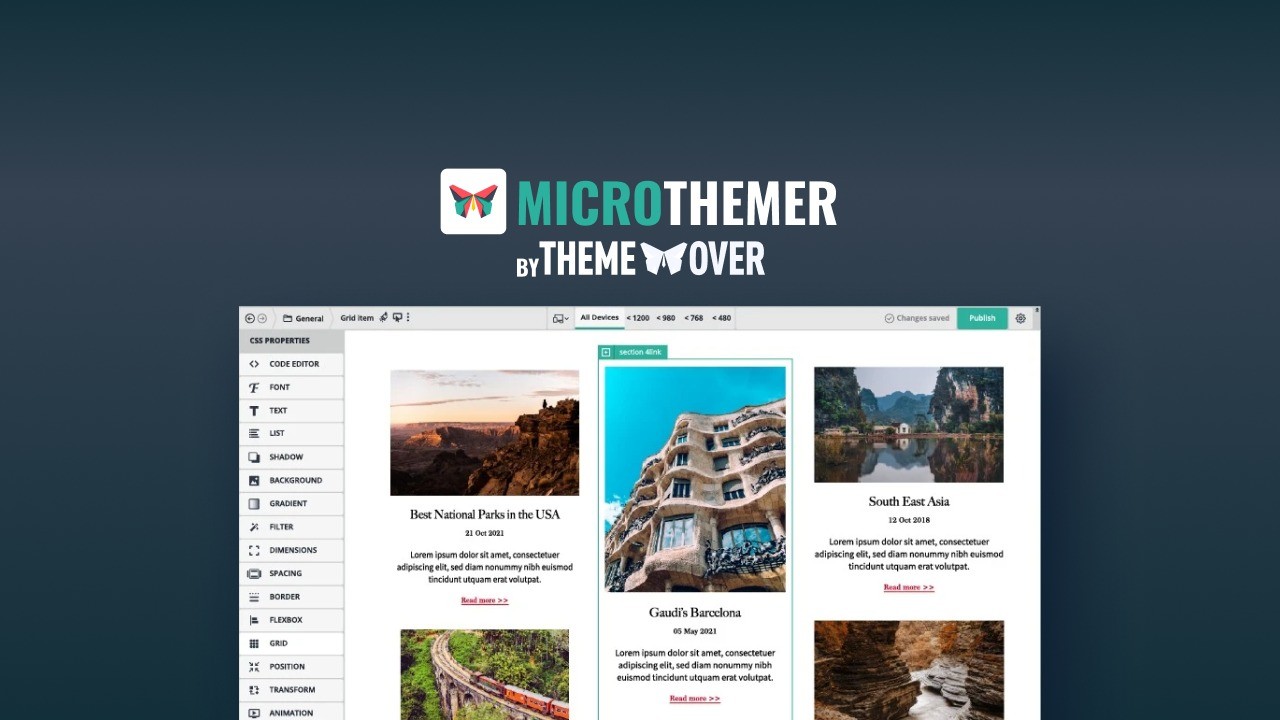
I started using Microthemer when I wanted a faster, more visual way to style WordPress sites without jumping between code and browser dev tools. It gives me a true visual CSS editor that works with Gutenberg, Elementor, Bricks, Divi and classic themes, plus responsive breakpoints you can tweak live. Day-to-day I use it to fix layout quirks, refine typography, and make small style changes in minutes; for bigger projects it’s great for site-wide tweaks and polishing responsive behavior before launch. The UI is surprisingly intuitive — you can flip between visual controls and code (CSS, Sass, JS) when you want more precision.
It outputs clean, lightweight CSS and the plugin is actively maintained, so I feel confident putting it on client sites. If you want a tool that speeds up styling work and teaches you useful CSS along the way, Microthemer is worth trying.
What People Say
Users praise Microthemer for genuine visual styling control and how it removes the back-and-forth with browser dev tools. Reviewers highlight compatibility across Gutenberg, Elementor and other builders, plus clean CSS output and good documentation. A few users mention a short learning curve but say the payoff is faster styling and fewer hacks.
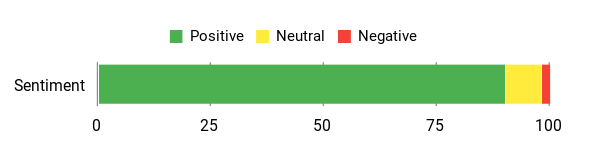
Overall Sentiment: Positive
🗣️ Urgul
Microthemer delivers true visual CSS editing across Gutenberg, Elementor, Bricks, Divi and classic themes. I stopped switching between dev tools and theme files — I can style anything on the page in real time and handle responsiveness with live breakpoints.
🗣️ b3915ed7c7a8494d9a6958b49b20ca85
Well designed and well documented — it felt like returning to WordPress after years and still found this tool immediately useful. The plugin is lightweight, outputs clean CSS, and the team keeps improving features like the AI beta.
Long-Term Cost Benefits
Microthemer helps reduce time spent on styling and debugging, which can cut billable hours or accelerate launches. For freelancers and small agencies, fewer manual CSS fixes and faster revisions translate to lower long-term maintenance costs and less time juggling browser tools and theme files.
Return On Investment
If you regularly style WordPress sites, you’ll likely recover the purchase quickly via saved hours. For occasional users it still adds value by making one-off fixes and responsive tweaks much faster than manual edits.
Usability
| Aspect | Ease Level | Notes |
| Onboarding | Easy | Installing and finding basic visual controls is straightforward; templates and clear labels help you start styling quickly. |
| Visual Editing | Easy | Selecting elements and applying style rules feels natural — true WYSIWYG styling with immediate feedback. |
| Code Mode | Moderate | Switching to CSS/Sass/JS gives precise control; helpful for those who want to fine-tune beyond visual controls. |
| Responsive Tools | Easy | Live breakpoints and responsive options make polishing mobile and tablet views simple. |
| Learning Curve | Moderate | Beginners might need a short learning period to understand selectors and cascading, but documentation is solid. |
Performance & Speed
Microthemer is lightweight and generates clean CSS, so it doesn’t bloat sites. In practice pages remain fast and styling changes apply instantly in the editor, which speeds up iterative design.
Integration Capabilities
| Software | Integration Quality |
| Major WordPress page builders & themes | Seamless — confirmed with Gutenberg, Elementor, Bricks, Divi and classic themes |
| Code editors (CSS / Sass / JS) | Good — smooth switch between visual and code modes for precise control |
| AI Assistant (beta) | Promising — available as an assistant to speed common styling tasks, with ongoing improvements |
| Responsive breakpoints | Excellent — live breakpoints that make mobile/tablet tweaks intuitive |
Security Features
| Feature | Protection Level |
| Active maintenance & support | High |
| Clean, minimal CSS output | Moderate |
| Compatibility with WordPress roles and themes | Moderate |
| Regular updates (plugin ecosystem) | High |
Reliability
Microthemer is reliable for daily styling and client work; users note the plugin is actively maintained and support responses are helpful when issues arise.
Collaboration
Best suited for individual designers or small teams; it supports workflows that mix visual editing and code, but it doesn’t provide a full multi-client white-label collaboration workspace.
Key Benefits
Visual CSS editing for any selectable element on the page
Works with major WordPress page builders and classic themes
Live responsive design tools and breakpoints
Switch between visual editor and code (CSS, Sass, JS)
Lightweight output with clean, efficient CSS
Active maintenance, documentation, and responsive support
Current Price: $59
Rating: 5.0 (total: 34+)
GutenKit - Plus Exclusive

I started using GutenKit when I wanted advanced page-builder features without leaving Gutenberg or writing custom code. It brings 65+ blocks, 18+ modules and hundreds of ready-made patterns that speed up building both everyday pages and one-off campaign or event sites.
Day-to-day I rely on its block library for landing pages, team pages and blog layouts; for special launches I use the dynamic content and custom query tools to surface the right posts and products. The plugin feels lightweight compared with bulky third-party builders, and the lifetime-license options many users mention make it an attractive long-term pick.
If you want to stay native to Gutenberg but still get pro-level controls, GutenKit makes that transition a lot smoother.
What People Say
I've seen users highlight how GutenKit makes the jump to Gutenberg painless — a rich widget set, easy-to-use blocks and noticeably smoother workflows compared with bulky third-party builders. Reviewers often call out the lifetime-license value and native, lightweight behavior.
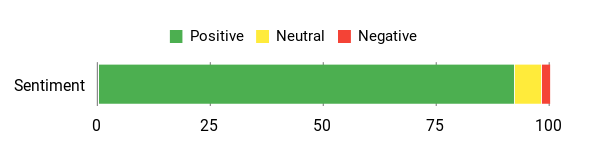
Overall Sentiment: Positive
🗣️ deanlind71
I wanted to 'get into' Gutenberg as I was tired of the high prices of third party page builders out there. But I did not want to sacrifice the functionality that you can achieve with those hi-end tools. Enter GutenKit. I was and am impressed with the plethora of widgets that it provides and I've found everything pretty easy to use. It all works as you'd expect and it's made transitioning into Gutenberg much easier that I believe it would have been without this collection.
🗣️ tunde825
I recently purchased GutenKit from AppSumo and went for Tier 3, It has completely transformed my WordPress design workflow! If you're using the Gutenberg editor and looking for a powerful way to enhance your website without dealing with complex coding, GutenKit is it and a must-have. It works natively with Gutenberg, ensuring a smooth and lightweight experience. This plugin provides a wide range of beautifully designed blocks that make creating professional-looking pages effortless. Getting this premium tool with a lifetime license is an absolute steal.
Long-Term Cost Benefits
Because GutenKit extends Gutenberg natively and offers lifetime licensing options, you avoid ongoing builder fees and reduce maintenance overhead. Over time that means fewer plugin conflicts, fewer updates to multiple builders, and less time spent rebuilding pages when switching themes or tools.
Return On Investment
If you regularly build or maintain sites, the time saved by ready-made patterns, blocks and dynamic query tools can quickly offset the purchase. For freelancers and agencies a smoother workflow plus fewer subscriptions translates to measurable savings over a year or two.
Usability
| Aspect | Ease Level | Notes |
| Onboarding | Easy | Installing and finding core blocks is straightforward; patterns and templates make it quick to assemble pages. |
| Block Library | Easy | Blocks are well organized and behave as expected inside Gutenberg, which shortens the learning curve. |
| Custom Queries & Dynamic Content | Moderate | Powerful for listings and dynamic pages, though users may need to experiment a bit to master query settings. |
| Performance | Easy | Built to be lightweight in the editor so pages stay responsive compared with some heavy page builders. |
| Learning Curve | Moderate | Beginners pick up the basics quickly, but advanced features like custom queries take a bit more time to master. |
Performance & Speed
GutenKit is designed to stay lightweight and integrates directly with Gutenberg, so editor responsiveness remains good and front-end pages avoid excessive bloat common to some third-party builders.
Integration Capabilities
| Software | Integration Quality |
| Gutenberg Editor | Excellent — built to extend Gutenberg natively with blocks, patterns and modules |
| Third-Party Themes | Good — works with most themes, though styling tweaks may be needed for custom theme CSS |
| Dynamic Content / Queries | Good — provides custom query and dynamic content tools that are powerful once configured |
| Ready-Made Patterns & Templates | Excellent — large library that speeds layout creation and ensures consistent styling |
Security Features
| Feature | Protection Level |
| GDPR-compliant | High |
| Active maintenance & support | High |
| Lightweight output | Moderate |
| Compatibility with WordPress roles | Moderate |
Reliability
In practice GutenKit feels reliable for client and personal projects; users report consistent improvements and responsive support when issues appear.
Collaboration
Well-suited for freelancers and small teams who share templates and patterns; it doesn't replace a full project management or white-label collaboration platform but supports shared workflow assets.
Key Benefits
Native Gutenberg blocks and modules — no need for heavy page builders
65+ blocks, 18+ modules and 500+ ready-made patterns and templates
Tools for custom queries and dynamic content to build smarter pages
Lightweight, performance-minded approach compared with many third-party builders
Lifetime license options reduce recurring costs and simplify maintenance
Speeds up both routine edits and full page builds
Current Price: $59
Rating: 4.8 (total: 30+)
Stunning
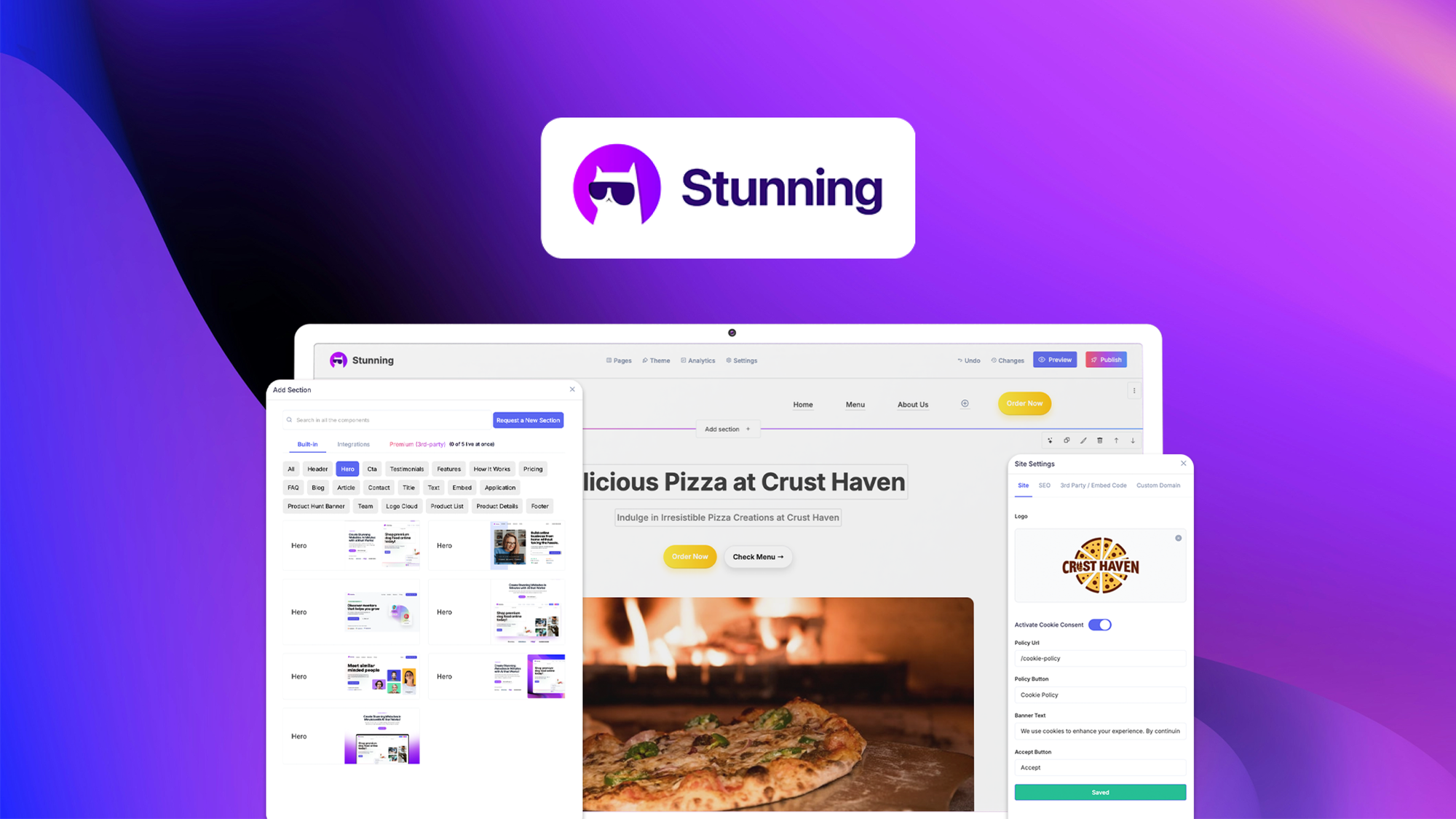
I started using Stunning because I wanted a faster way to build client sites without wrestling with code. It leans on AI to generate full pages and hero sections from a prompt, and there are ready-made blocks and templates to speed things up. Day-to-day I use it for quick portfolio pages, simple marketing sites and landing pages where turnaround matters; for special launches I lean on the AI content suggestions and the blog post generator to give me topic ideas and copy starters.
The platform is early-stage — I’ve seen bugs and missing widgets — but the team is active, responsive to feedback and shipping fixes. If you want to crank out decent-looking sites fast and white-label them for clients, Stunning is worth trying as an affordable, agency-friendly option.
What People Say
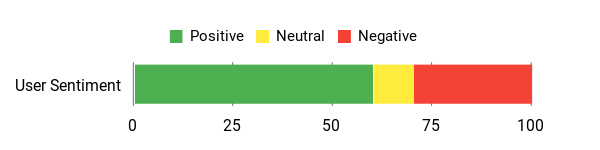
Users appreciate the AI site generation and the block library, and many call out the team's responsiveness to feedback — though several point out bugs and early-stage limitations.
Overall Sentiment: Mixed
🗣️ Josh_
As an agency owner I found the AI-generated hero and content sections promising — templates worked well in my tests and the team has been fixing issues quickly. I also liked the blog post generator that suggested topics based on site terms.
🗣️ zach013
The platform has a sleek UI and a great block selection. Core functionality is there and the team listens to feedback; unlimited sites on higher tiers make this an attractive deal if the roadmap is delivered.
Long-Term Cost Benefits
Because Stunning aims for lifetime pricing and white-labeling, agencies can avoid recurring builder fees and bundle site costs into client projects instead of paying monthly subscriptions.
Return On Investment
If you build multiple straightforward client sites, the time saved by AI generation and templates can pay back the purchase quickly—especially for freelancers or small agencies who value speed over granular custom control.
Usability
| Aspect | Ease Level | Notes |
| Onboarding | Easy | Signing up and spinning up a site with the AI flow is quick; prompts guide you through basic choices. |
| AI Site Generation | Moderate | Generates usable layouts fast, but you may need to tweak sections and content after creation. |
| Editor Experience | Moderate | Editor is sleek but can be glitchy at times; some users report load or save issues while it matures. |
| Template & Block Library | Easy | Blocks and templates speed builds for common pages; good fit for non-technical users. |
Performance & Speed
Editor and generated sites are generally snappy for basic pages; complex edits or export features are still being improved and may feel slower while the product evolves.
Integrations
| Software | Integration Quality |
| White Label / CNAME | Good — supports agency branding and custom domains |
| Blog Generator | Good — suggests topics and content tied to site terms |
| Third-Party Embeds | Moderate — basic embeds work but advanced integrations may need tweaks |
| Site Export (coming) | Planned — export features are under development in the Agency panel |
Security Features
| Feature | Protection Level |
| GDPR-compliant | High |
| White-label privacy options | Moderate |
| Role-based access | Moderate |
| Active updates from dev team | Moderate |
Reliability
Mixed in practice — the core idea works and templates are useful, but several reviewers experienced bugs and missing widgets while the team continues active development.
Collaboration
Supports white-label workflows and agency accounts; not a full project-management suite but useful for small teams sharing templates and sites.
Key Benefits
AI-powered generation that creates pages from simple prompts
No-code editor with ready-made blocks and templates
White-label and CNAME options for agencies
GDPR-compliant foundation
Built-in blog topic generator to jumpstart content
Affordable lifetime deal options for early adopters
Current Price: $59
Rating: 3.8 (total: 29+)
Waitlister

I've used Waitlister when I needed a quick, no-drama way to capture interest before a launch. It lets me spin up branded landing pages and waitlists in minutes, collect emails, and send automated welcome messages — which is perfect for day-to-day signups or when I'm teasing a big release.
For routine use I rely on its simple form builder and real-time analytics to track interest. For special launches, the segmentation, integrations, and email verification give me confidence we're getting quality leads. The product is straightforward, leans into simplicity over complexity, and the team responds to feedback.
If you want a lightweight tool to validate demand and manage pre-launch audiences without a steep learning curve, this is a practical option I’d try.
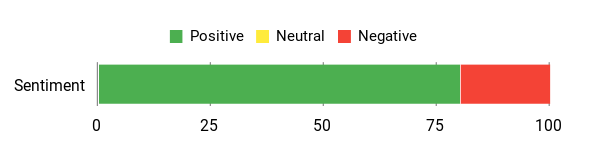
What People Say
People commonly highlight how easy it is to create clean landing pages fast, how intuitive the drag-and-drop and templates feel, and that support is responsive when small issues pop up.
Overall Sentiment: Positive
🗣️ ahesvn8888
I've used Waitlister for my first product launches, and it has quickly become one of our favorite tools. From the moment we started, the platform was incredibly easy to use even for non technical team members. Within minutes, we were able to create a clean, professional looking landing page, complete with branding, messaging, and a built in form to collect emails. I have only small issue with translation but support is very responsive and helpful. Highly recommend
🗣️ mavener
Fast and effective landing pages for the low-bandwidth brain. I chose drag and drop and found about 15 customizable templates; everything felt intuitive and mobile issues were easy to fix by adjusting the headline. Minor onboarding and navigation suggestions aside, it’s simple to customize and gets you live fast.
Long-Term Cost Benefits
Because Waitlister focuses on waitlists and simple automation, you avoid paying for a bulky marketing stack early on. For small teams or solo founders, the lifetime-style pricing on deals can reduce recurring costs while covering essential email sends and integrations.
Return On Investment
If you use it to validate ideas and collect pre-launch emails, the time savings in setup and the quality of leads from verification can quickly justify the purchase—especially when you convert a handful of engaged signups into paying customers.
Usability
| Aspect | Ease Level | Notes |
| Onboarding | Easy | Sign-up and creating a landing page are quick; non-technical team members can get a page live within minutes. |
| Editor & Templates | Easy | Drag-and-drop editor with around a dozen solid templates makes customization straightforward. |
| Form Capture & Automation | Moderate | Forms, welcome emails, and segmentation are simple to set up; some advanced options may need a learning pass. |
| Mobile Responsiveness | Moderate | Pages are mostly responsive; headline sizing sometimes needs manual adjustment for mobile. |
Performance & Speed
Pages and the editor are generally responsive for simple sites. More complex automations or large lists may slow certain views, but day-to-day performance feels snappy.
Integrations
| Software | Integration Quality |
| Standard API | Good — provides basic programmatic access for custom workflows |
| Webhooks | Good — supports real-time event forwarding to other services |
| Mailchimp / Klaviyo / Kit | Good — native integrations are available on higher tiers |
| CRM & Spreadsheets | Moderate — works well via webhooks or API but may need setup for advanced syncs |
Security Features
| Feature | Protection Level |
| Email Verification | High |
| Standard API Keys | Moderate |
| Data Export & Privacy Controls | Moderate |
Reliability
Solid for core waitlist and landing page use. A few reviewers noted minor UI/navigation quirks, but the core features and integrations are dependable for managing pre-launch audiences.
Collaboration
Provides team-friendly features like shared templates and integrations; not a full project management suite but adequate for small teams coordinating launches.
Key Benefits
Quickly build branded waitlist landing pages
Simple form capture with built-in email automation
Segmentation and real-time analytics to track interest
Integrations and webhooks for CRM and email tools
Email verification to improve lead quality
Affordable entry price for early-stage projects
Current Price: $59
Rating: 4.25 (total: 5+)
Scrollsequence

I've used Scrollsequence when I wanted that Apple‑style reveal without hiring an animation team. It turns video into image sequences that play as visitors scroll, which makes product storytelling feel interactive instead of passive. For everyday use I drop a scene into a product page to add motion and focus — it’s great for hero sections or step‑by‑step reveals.
For special launches or product pages where I want a little ceremony, I build longer sequences that guide people through a narrative. It’s surprisingly approachable: the plugin handles preloading and smoothing so the experience stays fluid, and the 10‑site license makes it easy to roll out across multiple client sites.
If you want a visually striking way to showcase a product or tell a short visual story, this is a practical tool I’ll reach for.
What People Say
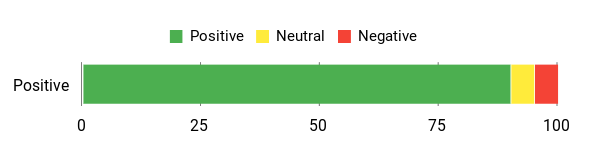
People highlight how Scrollsequence delivers polished, narrative-style reveals that make visitors feel in control while keeping the experience smooth; reviewers praise the visual impact and relative ease of getting a demo-ready sequence live.
Overall Sentiment: Positive
🗣️ HenrikT1
If you want to create an amazing user experience, get this. It works on WordPress and plain HTML sites. The narrative-style reveal — where scrolling gives the user a sense of control while unfolding a story — is what sold me. I used it to plan product reveals and demos, and it handled long sequences smoothly in the examples I tested.
🗣️ Will_Wow_Web
Built my first Scrollsequence site within a couple of hours. It’s pretty fast and easy to use, though I did spend time converting video to image sequences and trying settings. The end result looked visually stunning and added that wow factor I was after.
Long-Term Cost Benefits
A single purchase covers multiple sites and avoids recurring animation or developer costs for similar bespoke effects. For agencies or freelancers who build many product pages, that one-time price can reduce ongoing expenses compared with custom-built scroll animations.
Return On Investment
Because it creates attention-grabbing product reveals quickly, it can boost engagement and time on page without a large development budget. If higher engagement helps you convert even a few more visitors, the license often pays for itself fast.
Usability
| Aspect | Ease Level | Notes |
| Onboarding | Easy | Install the plugin and add a scene; basic setups are straightforward for anyone comfortable with WordPress. |
| Editor & Scene Setup | Moderate | Converting video to image sequences and tweaking frames takes some time, but the controls are clear and predictable. |
| Compatibility | Easy | Plays nicely with common builders like Elementor, Divi, and Oxygen; also works on static HTML pages. |
| Mobile & Performance Tuning | Moderate | Responsive scaling is built in, but large sequences need optimization to keep mobile performance smooth. |
Performance & Speed
Performance feels smooth for well-optimized sequences thanks to smart preloading and scroll smoothing. Very long or very high-resolution image sets can still impact load time if not optimized.
Integrations
| Software | Integration Quality |
| Elementor / Divi / Oxygen | Good — native compatibility makes embedding scenes simple |
| WordPress plugin | Good — installs as a standard plugin with familiar settings |
| HTML / CSS sites | Good — works outside WordPress for static site use |
| Image preloading & SEO settings | Moderate — helpful built-ins, but SEO impact depends on how sequences are used |
Security Features
| Feature | Protection Level |
| Regular plugin updates | Moderate |
| Minimal data collection | High |
| Works with WordPress security plugins | Moderate |
Reliability
Solid in tests and user examples — reviewers reported smooth playback and consistent behavior. Be mindful of large image sets which may need optimization to avoid slowdowns.
Collaboration
Not built around team collaboration, but scenes and assets can be reused across sites; suitable for small teams or agencies sharing project files.
Key Benefits
Create Apple-style image sequence scroll animations without custom code
One-time license ($74.99) that covers multiple sites
Smooth scroll delay and smart image pre-loading for fluid playback
Works with Elementor, Divi, Oxygen and plain HTML/CSS sites
Responsive scaling and SEO-friendly implementation
Good fit for product reveals, hero stories, and interactive demos
Current Price: $74.99
Rating: 4.4 (total: 10+)
aBlocks

I've used aBlocks when I wanted a lightweight alternative to full-featured builders. It gives you well-designed Gutenberg blocks that let me assemble hero sections, content rows, and course pages quickly — drag a block in, tweak text and spacing, and publish.
For everyday work I lean on it to speed up landing pages and small site edits; for product or course launches I bundle blocks into simple templates so pages stay consistent. It isn’t trying to replace heavyweight builders feature-for-feature, but as a no-code, fast way to get clean pages live, it’s a solid tool I reach for.
What People Say
Users praise time saved compared with Elementor and the thoughtful block UI, while some note that templates are simple and occasional plugin conflicts can occur.
Overall Sentiment: Mixed

🗣️ acf4b5171d674ea59d0527a05f7cf652
Your plugin save a lot of time which i was wasting for elementor , I tested your plugin because elementor was taking a lot of time in loading , although elementor has more features obviously but You have simplified page creation with simple designs. Thanks once again for your wonderful plugin , keep improving it . Best of luck
🗣️ andrew013
These simple but well thoughtout blocks work great for anyone who doesnt want to pay the = subscription to elementor. If you bought Academy LMS these have templates that work great with that plugin too.
Long-Term Cost Benefits
A one-time $39 purchase avoids recurring builder subscriptions. For small sites and course creators this can cut ongoing tooling costs, and the time saved in page assembly reduces development hours long term.
Return On Investment
Because it speeds up page builds and reduces reliance on heavier paid builders, you can often recover the cost quickly through saved time or by avoiding subscription fees.
Usability
| Aspect | Ease Level | Notes |
| Onboarding | Easy | Install the plugin, enable blocks, and start adding sections — basic setups feel immediate. |
| Editor & Block Setup | Moderate | Blocks are intuitive, but crafting more bespoke layouts takes a bit of tweaking in Gutenberg. |
| Templates | Moderate | Templates are usable and speed things up, though some users find them a bit basic compared with premium template libraries. |
| Conflict Handling | Moderate | One reviewer reported a crash likely due to a plugin/theme conflict — I recommend testing on staging and opening support if something odd appears. |
Performance & Speed
Generally lightweight and faster to load and edit than some subscription builders. Performance is good for typical content; conflicts or very heavy templates can cause issues, so test before pushing to production.
Integrations
| Software | Integration Quality |
| Gutenberg (WordPress) | Native — designed as blocks for Gutenberg |
| Elementor (comparison) | Alternative — not a drop-in replacement but faster for basic needs |
| Academy LMS | Good — reviewers note templates that work well with the LMS |
| Other WordPress plugins | Moderate — generally compatible but occasional conflicts reported |
Security Features
| Feature | Protection Level |
| Regular plugin updates | Moderate |
| Works with WordPress security plugins | Moderate |
| Minimal data collection | High |
Reliability
Mostly reliable in everyday use — blocks behave consistently and editing is stable. There is at least one report of a crash that was likely caused by a conflict, so I test on staging when adding it to a live site.
Collaboration
Not focused on multi-user workflows, but block templates and reusable patterns make it easy for small teams to keep pages consistent.
Key Benefits
Lightweight Gutenberg block library for fast page building
No-code page creation — drag, edit text, adjust spacing
Faster load and editing compared with heavy builders like Elementor
Templates and blocks that integrate with Academy LMS
One-time price of $39 keeps costs predictable
Current Price: $39
Rating: 3.75 (total: 4+)
Urals

I've been using Urals to build quick, focused microsites that live in social bios and convert traffic without the usual fuss. It shines when I need a fast page for a new offer, an event signup, or a short campaign — drag in reusable blocks, drop links, and Urals auto-generates thumbnails, titles, and descriptions so pages look polished right away.
For daily use I make collections of microsites to cross-promote content across Instagram, YouTube, and messaging apps; for launches or special promotions I assemble a few pages and reuse templates so everything stays consistent and fast to update. It's GDPR-compliant, lightweight, and designed around attention-short audiences who want clarity over bells and whistles. I’d recommend it if you want a simple, time-saving way to put beautiful micro-landing-pages in front of your followers without hiring dev help.
What People Say
Users consistently praise the speed of building microsites, reusable blocks, and the automatic generation of thumbnails and metadata — all things that make promo work less fiddly.
Overall Sentiment: Positive

🗣️ AlexE
I recently purchased Urals and tried it out now. I'm blown away! As an entrepreneur, I know how crucial it is to showcase my products and content effectively, and this tool makes it so easy. I can create stunning microsites in no time and link them to my social media bios. The best part? I can reuse blocks and templates, saving me tons of time without sacrificing quality. If you're looking to boost your online presence, you've got to give this tool a try!
🗣️ 73wa
Holy smokes, Urals is the real deal! I've struggled to promote my offers across different platforms, but this tool has made it a breeze. The user-friendly interface lets me whip up eye-catching microsites with customisable link blocks and sidebars that engage users. Plus, it automatically generates titles, thumbnails, and descriptions from my links and is effortless and quick to use.
Long-Term Cost Benefits
Buying Urals as a one-time $39 tool can replace recurring subscriptions for simple microsites and social landing pages. Over time, the hours saved creating repeat pages and reusing blocks often outweigh the initial cost, especially for small teams or solo creators.
Return On Investment
Because Urals speeds up page assembly and helps centralize links and offers, you can quickly recover the cost through time saved and improved conversions from clearer social-bio landing pages.
Usability
| Aspect | Ease Level | Notes |
| Onboarding | Easy | Sign-up and a first microsite felt straightforward — I was able to create a page and add links in minutes. |
| Templates & Blocks | Easy | Reusable blocks make repetitive pages fast to assemble; I bundle collections for recurring campaigns. |
| Editor | Moderate | Editing is intuitive for basic layouts. If you want very custom designs you'll spend a bit more time tweaking blocks. |
| Mobile & Social Links | Easy | Pages are optimized for social-bio use and the auto-generated thumbnails/titles save extra setup steps. |
Performance & Speed
Fast for lightweight microsites — pages load quickly and the auto-generation of metadata speeds setup. For complex needs, you might bump into limits but performance for social landing pages is solid.
Integrations
| Software | Integration Quality |
| Instagram / Social Bios | Direct — designed to be linked from profiles and bios |
| YouTube | Good — use microsites in channel descriptions and video links |
| Messaging Platforms (Telegram, WhatsApp) | Good — short, shareable microsites work well in chats |
| Linktree-style workflows | Alternative — provides richer microsites compared with simple bio link lists |
Security Features
| Feature | Protection Level |
| GDPR Compliance | High |
| Minimal required data | Moderate |
| Auto-generated metadata (no extra tracking setup) | Moderate |
Reliability
Stable for everyday use — reviewers report consistent behavior and fast page creation. I would still test critical pages before major launches.
Collaboration
Collections and reusable blocks make it easy for small teams to stay consistent; not a full multi-user CMS but good for shared templates and bulk updates.
Key Benefits
Create reusable microsites and collections to cross-promote offers and content
Auto-generate cover images, thumbnails, titles, and descriptions from links
Quick templates and reusable blocks save time on repeat campaigns
Built to be linked into social bios (Instagram, YouTube, Facebook, Telegram, WhatsApp)
GDPR-compliant and lightweight — good for attention-focused audiences
One-time price of $39 keeps costs predictable
Current Price: $39
Rating: 5 (total: 4+)
FAQHow Do I Choose The Right Website Builder For My Dream Site?
I always start by naming the purpose of the site and the outcome I want to inspire, then I match that vision to a tool that offers the right mix of simplicity, power, and support. If I need to launch quickly without code I look for builders with no-code acceleration and strong templates; if I plan to scale or customize heavily I lean toward WordPress toolkits and styling tools like Microthemer ($59) or Nexter ($49) for control.
I check whether hosting, SSL, CDN, backups, and export options are included because vendor lock-in and lack of external backups are common concerns. I also read real reviews to judge responsiveness of support and roadmap health, and I test the AI or template features in a demo site before I commit so I know the tool fits my workflow and budget.
Will My Site Be Fast, Secure, And Searchable?
We treat speed, security, and discoverability as inseparable parts of the experience because a beautiful site that nobody can find or that loads slowly will never fulfill its promise. I verify the platform uses a CDN or reliable hosting, enforces SSL, offers easy DNS guidance (DNS changes can break email and SSL so I follow instructions carefully), and provides sitemap and meta controls for SEO. For practical peace of mind I enable image optimization, mobile responsiveness, and structured content for search engines, set up automated backups or export strategies when available, and test forms and e-commerce flows end to end before launch to catch common pitfalls.
How Do I Start Building And Launch Fast Without Getting Overwhelmed?
I begin with a small, content-first plan: a clear headline, a short about section, hero image, and a single call to action, then I use AI builders or prebuilt templates to generate a foundation I can edit. I focus on one break point at a time for responsive tweaks, connect analytics and email capture, and launch an MVP so I can learn from real visitors rather than perfecting in a vacuum. If I expect clients or team collaboration I choose a product with roles, white-label options, or agency features and I budget for an initial tool cost (many AppSumo-style deals range from about $39 to $75) plus any domain or premium integrations.
Finally, I iterate: collect feedback, prioritize two or three improvements per sprint, and keep the momentum so the dream site becomes a living, growing asset rather than a stalled project.
Dream Builders FavoritesWe Dream Builders weigh ease of use, creative flexibility, and future growth when choosing between WebStarts, Greta, and Nexter—favoring WebStarts for approachable, budget-friendly drag-and-drop building, Greta for AI-driven personalization and rapid launches, and Nexter for scalability and deep integrations. Ultimately we prioritize intuitive design tools, reliable support, and performance that lets our visions scale, so we choose the platform that best balances creativity, speed, and long-term potential.
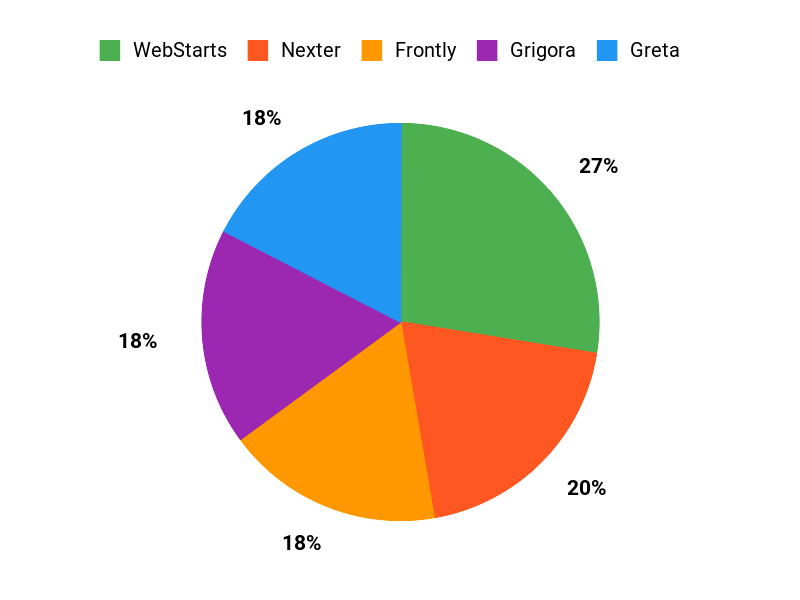
Wrapping Up Building a site no longer needs to be a chore. Pick the right tool for your stage: if you want a dependable all-rounder I recommend WebStarts for speed and polish; if you’re starting from zero and want an AI boost, Grigora gets you past the blank page; when you need advanced WordPress styling, Microthemer gives precise control.I chose tools here to cover beginners, agencies, WordPress pros, and those who want strong value. Use this shortlist to match the platform to your goals, and you’ll spend less time fighting software and more time building the business you imagined.
Product Image Rating User-Friendliness Key Highlights Pricing Plans
WebStarts
4.7/5 (334 reviews) Highly intuitive drag-and-drop interface, minimal learning curve.
Built-in SEO tools
E-commerce integration
Responsive support
Ongoing feature updates
One-time payment of $69 Greta
4.0/5 (161 reviews) Moderate learning curve but offers dynamic capabilities for building full-stack apps.
AI-assisted design
Ready-made UI components
Multi-functional apps development
Simple integration with APIs
One-time payment of $59 Nexter
4.7/5 (107 reviews) Easy to navigate, especially for WordPress users.
Comprehensive toolkit with over 90 blocks
Fast and lightweight performance
Supports multiple templates for quick site setups
Active developer support and regular updates
One-time payment of $49 Frontly
4.5/5 (95 reviews) No-code builder, designed for quick web app creation.
AI-driven customization
Extensive web app features
Fast setup with templates
Mobile-friendly designs
One-time payment of $59 Grigora
4.6/5 (74 reviews) Intuitive drag-and-drop interface, perfect for beginners.
AI processing for website generation
Robust template selection
SEO tools included
Active community and support
One-time payment of $59 Vzy
3.4/5 (53 reviews) Straightforward setup; some features still in development.
AI-powered site creation
Customizable designs
Integration with external services
Mobile responsiveness features
One-time payment of $69
What exactly are these 'revolutionary tools' for website building?
These 'revolutionary tools' refer to a new generation of website development platforms and software designed to democratize website creation, making it accessible to individuals and businesses without extensive coding knowledge. They typically integrate advanced features such as:
- Intuitive Drag-and-Drop Editors: Allowing users to visually arrange elements on their page.
- Pre-designed Templates: Offering professional starting points that are fully customizable.
- AI-Powered Assistants: Some tools use artificial intelligence to help generate content, design layouts, or even build a preliminary website based on user input.
- Integrated Hosting & Security: Often bundling essential services like web hosting, SSL certificates, and performance optimization directly into the platform.
- Extensible Functionality: Providing app stores or integrations for adding e-commerce, booking systems, forms, and other advanced features with ease.
The core idea is to simplify the entire process, from design to deployment, empowering users to create stunning and functional websites quickly and efficiently.
Do I need any coding or technical skills to use these modern website building tools?
No, one of the primary advantages of these revolutionary tools is that they are specifically designed to be used without requiring any coding or deep technical skills. They operate on a 'What You See Is What You Get' (WYSIWYG) principle, meaning you build your website visually.
- You can add text, images, videos, and other elements by simply dragging them onto your page.
- Customization options for colors, fonts, layouts, and animations are typically managed through user-friendly menus and settings.
- The underlying code is automatically generated and optimized by the platform, so you don't need to write or understand it.
This approach makes website creation accessible to entrepreneurs, creatives, small business owners, and anyone who wants a professional online presence without the steep learning curve traditionally associated with web development.
What types of websites can I create using these innovative tools?
These innovative tools are incredibly versatile and can be used to build a wide array of website types, catering to diverse needs. Their flexibility means you're not limited to just one kind of online presence. Common types of websites you can create include:
- Business Websites: Professional sites for small to large businesses, showcasing services, portfolios, and contact information.
- E-commerce Stores: Fully functional online shops for selling products, complete with product listings, shopping carts, and secure payment gateways.
- Personal Portfolios: Websites for artists, photographers, writers, or professionals to display their work and resume.
- Blogs: Platforms for sharing articles, news, and personal insights with an audience.
- Landing Pages: Single-page websites designed for marketing campaigns to capture leads or promote specific products/events.
- Event Websites: Pages dedicated to promoting events, handling registrations, and providing key information.
- Non-Profit & Community Sites: Websites for organizations to raise awareness, solicit donations, or manage volunteers.
The capabilities often extend to custom forms, membership areas, appointment booking systems, and more, depending on the specific tool chosen and any available integrations.
How much does it typically cost to build and maintain a website with these revolutionary tools?
The cost of building and maintaining a website with these revolutionary tools can vary significantly depending on the platform, the features you need, and your chosen subscription plan. Generally, you can expect a range of options:
- Free Tiers: Some platforms offer free plans, which are great for testing or very basic personal sites, but often come with limitations like platform branding, less storage, or a custom subdomain (e.g., yourname.platform.com).
- Subscription Plans: Most popular tools operate on a monthly or annual subscription model. These plans typically range from $10 to $50+ per month, with higher tiers offering more features (e.g., e-commerce functionality, more storage, advanced analytics, custom domain connection, no platform ads). Annual subscriptions often provide a discount.
- Domain Name: A custom domain name (e.g., yourwebsite.com) usually costs an additional $10-$20 per year, though many premium plans include a free domain for the first year.
- Add-ons & Integrations: While many essential features are built-in, specialized functionalities (like advanced SEO tools, premium stock photos, or specific app integrations) might incur additional costs.
Compared to hiring a web developer for a custom build, these tools offer a significantly more cost-effective solution, providing powerful features and professional results at a predictable monthly or annual fee.
What's the first step I should take to build my website using these revolutionary tools?
The journey to building your dream website with these revolutionary tools begins with a clear vision. Here’s a recommended first step and subsequent actions:
- Define Your Website's Purpose and Goals: Before touching any tool, ask yourself:
- What is the primary objective of your website (e.g., sell products, share information, generate leads, build a portfolio)?
- Who is your target audience?
- What content do you want to feature?
- What actions do you want visitors to take?
Having a clear understanding of your goals will guide all your subsequent decisions, from choosing the right platform to designing your layout.
- Research and Choose a Platform: Based on your defined goals, research various website builders (e.g., Wix, Squarespace, Shopify for e-commerce, Webflow for design flexibility) to find one that best fits your needs, budget, and desired feature set.
- Select a Template or Start from Scratch: Most platforms offer a wide range of professional templates. Choose one that aligns with your brand and functional requirements.
- Customize and Add Content: Utilize the drag-and-drop editor to personalize your site with your branding, text, images, and other media.
- Publish Your Website: Once you're satisfied with your design and content, connect your custom domain (if applicable) and launch your website to the world!
Starting with a clear purpose ensures your website is not just beautiful, but also effective in achieving your objectives.
- Define Your Website's Purpose and Goals: Before touching any tool, ask yourself: